

Room size is a starting point, not the whole cooling calculation. For air conditioning for server rooms in Pretoria, a 4 m² room has a guide cooling requirement of up to 2 kW, while a 9 m² room has a guide requirement of 2-3 kW. The final load also depends on the heat produced by the IT equipment and how the room is arranged.
When planning air conditioning for server rooms in Pretoria, floor area is only one part of the calculation. Equipment load and airflow matter just as much. This guide explains how to assess cooling needs, compare suitable options, and plan installation, upgrades and maintenance. Start with the room’s heat load and operating requirements, not unit size alone.
Key Takeaways
- Use room area as an initial guide, then assess IT equipment heat output and airflow to establish the cooling load.
- Compare cooling layouts against the room’s size, equipment arrangement and how air needs to circulate.
- Plan installation and upgrades around changing IT loads, and include regular maintenance to support reliable cooling.
- Manage temperature and humidity together, since both influence the conditions equipment operates in.
Cooling load and IT equipment requirements
Room area is a starting point, but the IT load determines how much heat the cooling system must remove. A site survey should map equipment, airflow paths and room conditions before capacity is selected.
Pretoria’s hot weather can increase heat entering a server room, while power outages can stop cooling equipment and allow temperatures to rise. Include these conditions when assessing the room’s heat load and cooling continuity.
If cooling fails, equipment can overheat. Condensation can expose components to moisture, and inadequate ventilation can trap heat. Assess air movement and moisture control alongside the heat output of the equipment.
Cooling load assessment
Start with the IT equipment’s heat output, then record room dimensions, rack locations, lighting and other heat-producing equipment. As a guide, a 4 m² server room may require up to 2 kW of cooling; a 25 m² room may require 3.5-5 kW. These examples are initial references, not substitutes for a room-specific load calculation.
During a site survey, document equipment positions, airflow obstructions and current temperature patterns. Note planned server additions too, as a growing IT load can change the required cooling capacity.
Energy-efficient cooling
Match cooling capacity to the calculated load instead of choosing a unit based only on floor area. Oversized or poorly directed cooling can waste energy without resolving hot spots around racks. A survey should identify supply and return airflow paths, door gaps and obstructions that affect how conditioned air reaches equipment.
Keep filters and air paths clear through scheduled air-conditioner maintenance. Where ventilation is part of the room design, industrial ventilation fans and louvers can support air movement and heat removal, depending on the layout and cooling strategy.
Temperature and humidity ranges
Maintain stable conditions within the temperature and humidity ranges specified for the installed IT equipment. Limits can vary between equipment, so use manufacturers’ operating guidance rather than applying one universal target to every server room.
During a survey, record temperature and humidity at equipment air intakes, not just near the doorway. Check for warm zones, cold draughts and signs of moisture. These observations can reveal uneven airflow or condensation risks and help guide changes to the cooling arrangement.
Cooling options for data centres
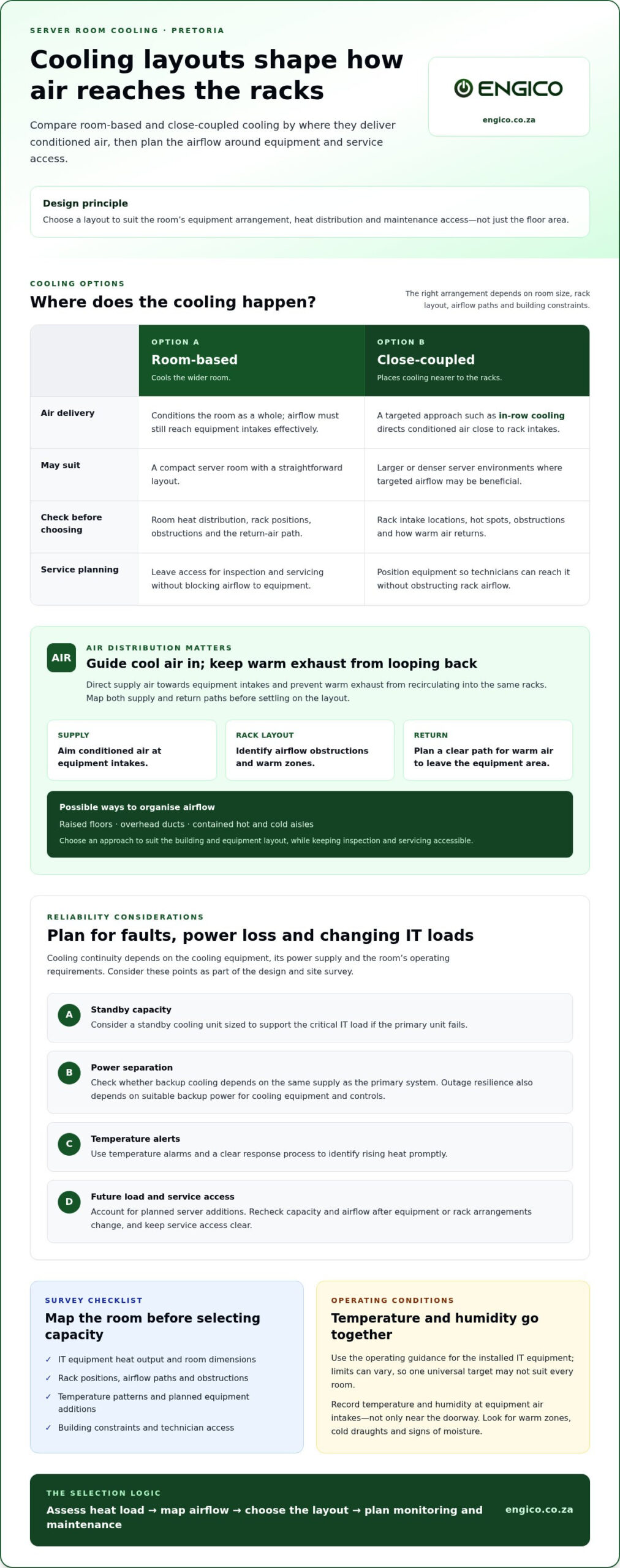
Cooling design should suit the server room’s equipment layout, heat distribution and maintenance access. Room-based systems cool the wider space, while close-coupled designs place cooling nearer to racks. The choice affects how air reaches equipment and how easily technicians can work around it.
Air distribution matters as much as the cooling equipment. Direct supply air towards equipment intakes and prevent warm exhaust from recirculating into the same racks. Raised floors, overhead ducts or contained hot and cold aisles can organise airflow, depending on the building and equipment layout. Each approach also needs access for inspection and servicing.
What backup cooling and redundancy options are recommended for server rooms? Consider a standby cooling unit sized to support the critical IT load if the primary unit fails. Redundancy during a power outage also depends on suitable backup power for the cooling equipment and controls.
- Standby capacity: Arrange primary and backup cooling so a single equipment failure doesn’t leave racks without cooling.
- Separate power: Consider whether backup cooling depends on the same supply as the primary system.
- Fault alerts: Use temperature alarms and a clear response process to identify rising heat promptly.
- Service access: Position equipment so technicians can inspect components without blocking rack airflow.
Compare options against the room’s current load, future equipment plans and building constraints. A Pretoria site survey can map airflow and identify a suitable arrangement before installation or redesign.
Installation, upgrades and maintenance
Plan server room cooling around the IT load, building layout and access requirements. A documented installation sequence helps coordinate cooling equipment, electrical capacity, controls and commissioning while accounting for the room’s operating needs.
In Pretoria, permits and building requirements depend on the proposed work, such as changes to walls, external equipment placement or drainage. Check the relevant municipal and building-owner requirements for the specific installation. The responsible electrical professional should also address electrical capacity, isolation and protection.
Before installation, record the existing cooling arrangement, rack positions and equipment heat output. Confirm where indoor and outdoor units can be placed, how pipework and condensate drainage will be routed, and whether technicians can reach filters and service points. During commissioning, test airflow and controls under normal operating conditions, then document settings for future maintenance.
For an upgrade, compare the revised IT load with the existing system’s capacity. Adding servers or rearranging racks can create new hot spots even when the room’s floor area stays the same. Review airflow paths and control settings after each change, and schedule installation work to limit disruption to equipment operation.
Follow the equipment requirements and operating conditions when planning maintenance. Checks can include filters, coils, refrigerant levels, duct leakage, airflow, control sequences, electrical terminals, motor oiling, belts and thermostat accuracy. Keep a service record with dates, observations and corrective work to make recurring faults or changes easier to identify.
Building Management System integration can bring cooling equipment into a wider monitoring arrangement. Set clear alarm thresholds for temperature changes and cooling faults, then define who responds to each alert. Keep an operating record of system settings, maintenance history and escalation steps for cooling interruptions.
- Record the room layout and cooling settings after installation or upgrades.
- Log maintenance findings and recurring faults in one service record.
- Review airflow and controls whenever server racks or equipment change.
What temperature and humidity ranges should a server room maintain?
No single temperature and humidity range suits every server room. Set targets within the operating limits specified by each equipment manufacturer, then maintain stable conditions at server air intakes.
Review the equipment documentation and record its permitted temperature and humidity ranges. If servers have different limits, use the overlapping operating range for the room. This gives cooling controls a practical target without relying on a generic figure that may not suit the installed equipment.
Sensor position affects the readings you rely on. Place temperature and humidity sensors near rack air intakes, and compare readings across the room. A sensor beside the door, for example, may miss warmer conditions near a fully loaded rack. Check the return-air path too, as exhaust readings can reveal uneven cooling and recirculation.
Monitor humidity alongside temperature. Air that is too damp can contribute to condensation, while very dry conditions can raise static-related concerns. Watch for moisture on surfaces, damp smells or changing readings after cooling adjustments. These signs warrant investigation of airflow, drainage and control settings.
Use a consistent monitoring routine to spot trends before they become operating problems. Record readings at representative rack positions, note room conditions and compare results with equipment limits. If an alarm sounds, check whether the change affects one rack or the wider room, then follow the site’s response procedure.
- Set targets: Use the manufacturers’ operating limits for installed servers.
- Position sensors: Measure conditions near equipment air intakes and compare locations.
- Review humidity: Look for moisture, condensation signs and unusual reading changes.
- Keep records: Log readings and cooling adjustments to identify recurring patterns.
For a practical review of temperature control and air-conditioner performance, arrange a server-room cooling assessment.
Engico Air Conditioning: Wall-mounted Split Air Conditioners
Engico Air Conditioning can help match a cooling arrangement to your server room’s layout and equipment requirements. Wall-mounted Split Air Conditioners may suit a smaller room with a suitable wall position, while Multi-split Air Conditioners can serve multiple areas. Ceiling Cassette Air Conditioners and Ducted Air Conditioning Systems offer alternatives where ceiling or duct distribution better fits the space.
Consider the room’s heat load, rack arrangement, airflow and service access before selecting a system. Engico Air Conditioning also provides air-conditioner maintenance, servicing and repairs to support ongoing cooling performance. For an installation, upgrade or maintenance need, contact Engico to discuss your server room’s cooling requirements.
Plan your next server room cooling step
Planning air conditioning for server rooms in Pretoria is an opportunity to align cooling decisions with future IT needs, not just the current setup. Before making changes, bring together the room layout, equipment plans and operating priorities. This gives the next discussion a practical starting point and focuses attention on the requirements that matter most.
Engico Air Conditioning supplies Wall-mounted Split Air Conditioners, Multi-split Air Conditioners and Ceiling Cassette Air Conditioners. The right option depends on the room layout and how conditioned air needs to reach the equipment. Discussing the space and its intended use helps define the next step without assuming one system suits every server room.
Whether you’re planning a new installation or reviewing an existing setup, Engico Air Conditioning can discuss relevant cooling options. Contact Engico Air Conditioning to start a conversation about your server room requirements and move forward with a considered plan.
Frequently Asked Questions
What types of air conditioning are suitable for server rooms in Pretoria?
For air conditioning for server rooms in Pretoria, options include wall-mounted split, multi-split, ceiling cassette and ducted systems. Air handling units may suit larger or more complex spaces. The right choice depends on room layout, rack positions, heat load and airflow needs. For example, a wall-mounted unit needs a position that distributes cool air effectively without creating uneven conditions around equipment.
How do you calculate the cooling capacity needed for a server room?
Add the heat output of servers and other equipment, using manufacturer specifications or power data as a guide. Include networking equipment, storage, UPS units and lighting where they add heat. Then account for room dimensions, insulation, airflow and planned equipment growth. Express the resulting cooling load in kW and compare it with system capacity to assess whether the proposed setup meets the room’s requirements.
What are typical server room air conditioning installation prices in Pretoria?
Installation costs depend on the project and are provided after a quote request. Factors include required cooling capacity, system type, access, pipework routes, drainage and control requirements. A straightforward installation differs from work involving extensive ducting or room changes. Preparing the room layout and equipment details helps define the scope and gives the quote request a practical starting point.
Which Pretoria companies install and maintain server room air conditioning?
Engico Air Conditioning provides installation, maintenance, servicing and repairs in Pretoria, Johannesburg, Centurion, Menlyn, Farie Glen, Silverton, Waterkloof, Gezina, Doringkloof, Midrand, Waterfall, Sunninghill, Woodmead, Sandton, Randburg, Roodepoort, Fourways, Hyde Park and across Gauteng. For a server room project, prepare the room layout, equipment details and planned IT changes. Engico’s split, multi-split, ceiling cassette and ducted systems can be considered according to the space and its operating needs.
Should a server room use precision cooling or standard split air conditioning?
Choosing air conditioning for server rooms in Pretoria means weighing the IT load, room layout, operating conditions and airflow control needs. A standard split system may suit a smaller, less complex room if it distributes air effectively. Precision cooling is designed for tighter environmental control. Compare how each approach handles continuous heat, temperature stability, equipment arrangement and service access before selecting a system.
What maintenance schedule and running costs should you expect for server room air conditioning?
Follow the equipment manufacturer’s maintenance guidance and adapt checks to the room’s operating conditions. Servicing can cover filters, coils, refrigerant checks, airflow, electrical terminals and thermostat accuracy. Running costs depend on cooling demand, operating hours, system efficiency, outdoor conditions and control settings. Keep service records and monitor energy use, particularly after adding equipment or changing the cooling arrangement.
Recent Comments